My Philips Airfryer is not showing on the HomeID App device list
Published on 16 October 2024
Discover how to find the device model of your Philips Airfryer in the HomeID list in our article below.
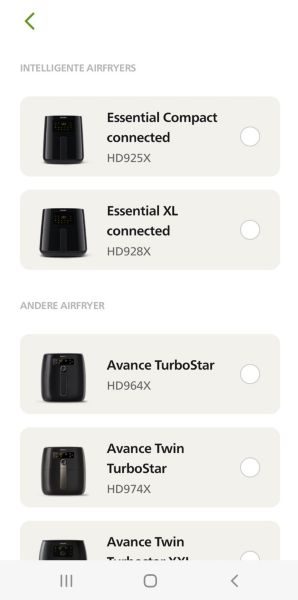
Search with model number
In the HomeID App, the device model number is shortened by using an "x". For example, if you have the Philips Airfryer model HD9650, you can select HD965x in the app.
If your device model is still not on the list, it means that your Airfryer might not have been released for your chosen country. In that case, please contact our After-Sales support services and they will direct you to the relevant resource.
If your device model is still not on the list, it means that your Airfryer might not have been released for your chosen country. In that case, please contact our After-Sales support services and they will direct you to the relevant resource.
Personalise presets (HD9285, NA32x, NA33x and NA34x)
For HD9285, you can personalise the presets by short-pressing the preferred preset icon and adjusting the time and/or temperature. Then, long-press the same preset icon until the device starts beeping to save your personal settings.
For NA32x, NA33x and NA34x, you can personalise the factory presets by:
- Pressing the preset you want to change.
- Adjusting the time and/or temperature.
- Pressing the time or temperature button to confirm.
- Pressing the time or temperature button again to go back to the main menu.
- Pressing and holding the same preset button for two seconds to save the settings to your favourite. You will hear a beep after the setting is saved.
You can also save your favourite preset by using "☆" — the favourite button:
- Press the On/Off button to switch on the appliance.
- Press the "☆" favourite button.
- Press the temperature button.
- Select the temperature.
- Press the time button.
- Select the time.
- After selecting the time, press the time button to return to the main menu.
- Press and hold the "☆" favourite button for two seconds to save the settings. You will hear a beep after the setting is saved.
- Press the Start button to start the cooking process.
For the above models, to reset a preset to the default time and temperature, short-press the preferred preset icon, then long-press the same preset icon again until the device beeps.
Did the solutions above help solve the issue? If not, please contact us for further assistance.

