TV buying guide: finding the best TV for you
By Philips
09/05/2025
2-5 min. read

Choosing a new TV doesn't have to be overwhelming. Whether you love movies, sports, or gaming, the right TV can transform your experience. This guide will highlight the key factors to consider, helping you find the perfect TV to fit your lifestyle. Let's dive in!
At a glance
- What do you mainly use the TV for?
- Understanding picture quality
- Display technology
- Choosing the right screen size
- Unique features to look for
- Conclusion
What do you mainly use the TV for?
Watching movies

Movie fans, here are the key things you'll need:
- 4K resolution: Full HD (1080p) gives you clear and detailed pictures, but 4K resolution is even better, offering four times the detail of Full HD.
- OLED or QD MiniLED display: OLED screens can show true black colors because each pixel lights up individually. QD MiniLED screens use tiny LEDs and Quantum Dot technology to create bright and vibrant colours with great contrast.
- Superior sound: For a captivating movie experience, superior sound is essential. Dolby Atmos and DTS:X provide 3D audio, surrounding you with sound from all directions. Integrated Bowers & Wilkins sound systems provide rich, detailed sound and impressive dynamic range.
- Large screen size (65 inches or above): A big screen makes watching movies at home feel like you're in a theatre. The larger the screen, the more immersive the experience.
Watching sports

Sports enthusiasts need a TV that can keep up with fast-paced action:
- High refresh rate (120Hz or higher): This means the TV refreshes the picture 120 times per second or more, making fast-moving scenes look smooth and reducing blur.
- Bright display (QD MiniLED or QLED): These types of screens are very bright, so you can see all the details clearly even in a well-lit room.
- Wide viewing angles: This feature makes sure that the picture looks good from any seat in the room. Whether you’re sitting in the centre or off to the side, the view will still be great.
- Good motion compensation: TV processors with good motion compensation such as Philips P5 engine can change pictures quickly without leaving a trail behind moving objects, known as ghosting or blurring.
Gaming

Gamers want a TV that improves their gaming performance with quick response times and superior picture quality:
- Low input lag: This means the time it takes for your actions on the controller to show up on the screen is very short.
- VRR (Variable Refresh Rate): A TV with VRR changes refresh rate to match the game’s frame rate, making the game look smoother.
- HDR (High Dynamic Range) support: HDR enhances the visuals with better contrast and more vivid colours which makes games look more realistic and exciting. When a TV with HDR support is paired with brilliant HDR games, the visuals become significantly more vivid and life-like.
- G-Sync and FreeSync Premium compatibility: These technologies make sure the TV’s refresh rate matches your gaming device, which helps reduce screen tearing and stuttering, making the game play smoothly.
Understanding picture quality
Resolution
When it comes to picture quality, resolution is a critical factor. Modern TVs typically offer full HD (2K) or Ultra HD (4K) resolution.
Full HD (2K): Provides a resolution of 1920x1080 pixels, offering good image quality suitable for regular screens or less demanding viewers. Philips TV offers Full HD for TVs up to 43 inches.
Ultra HD (4K): Boasts a resolution of 3840x2160 pixels, delivering sharper and more detailed images. This is ideal for larger screens and viewers who want the best possible picture quality.
Display technology
Different display technologies offer varying strengths:
OLED (organic light emitting diodes): Known for its perfect blacks, infinite contrast, superior colour accuracy, and ultra-wide viewing angles. OLED TVs provide the best picture quality, especially in dark environments.
QD MiniLED: Uses smaller LEDs compared to traditional LED TVs, enabling more precise backlight control. As a result, brightness is improved, blacks are deeper, and contrast is better. The “Mini” in QD MiniLED refers to the small size of the LEDs used.
QLED (quantum-dot LED): Enhances the LED panel with quantum dots, which are tiny semiconductor particles that emit light. This technology provides more accurate, detailed, and vivid colours, as well as improved brightness and energy efficiency.
LED (light emitting diodes): Provides good brightness and moderate contrast, suitable for general viewing. LED TVs are often more affordable and come in a wide range of sizes.
HDR10+: This is an advanced HDR format. HDR enhances pictures by combining three elements: expanded dynamic range, wider colour gamut, and increased bit depth. With HDR10+, you can expect more vibrant and lifelike images with dynamic metadata for scene-by-scene optimization.
Dolby Vision: Another advanced HDR format that dynamically adjusts brightness and colour on a scene-by-scene basis. It brings real value by offering a more refined and detailed picture quality, making every scene look its best.
HLG (Hybrid Log-Gamma): Developed for live broadcasts, HLG combines standard dynamic range and HDR in one signal. This is particularly beneficial for watching live sports and events, providing a more realistic and viewing experience.
P5 AI Picture Engine: P5 AI Picture Engine from Philips ensures you get the best picture quality possible. It dynamically adjusts settings to compensate for ambient lighting and the content being displayed, no matter what source content you have.
Variable refresh rate (VRR): VRR adjusts the TV’s refresh rate to match the content’s frame rate, reducing screen tearing and stuttering for smoother visuals, especially in gaming.
Choosing the right screen size
The size of your TV should match your viewing environment and personal preferences. Here are some general guidelines:
42-43 inch TVs:
Ideal for small rooms or secondary TVs in bedrooms or kitchens. These sizes are compact and fit well in limited spaces.
Recommended viewing distance: 157 cm
48-50 inch TVs:
Suitable for medium-sized living rooms. These TVs provide a larger screen without overwhelming the space, making them great for family viewing.
Recommended viewing distance: 183 cm
55 inch TVs:
A popular choice for most living rooms, offering a balance of size and viewing experience. It's perfect for a movie night with your loved ones.
Recommended viewing distance: 201 cm
65 inch TVs:
Great for larger living rooms, providing an immersive viewing experience. These TVs offer a cinematic feel and are ideal for watching movies and sports.
Recommended viewing distance: 238 cm
75-77 inch TVs:
Made for home theatres or large rooms where you want a cinema-like experience. These large screens are great for watching with a group.
Recommended viewing distance: 274 cm
85 inch TVs:
Best for very large rooms or dedicated home theatre setups. These TVs provide the ultimate cinematic experience for high-end home theatre enthusiasts.
Recommended viewing distance: 311 cm
Unique features to look for
Ambilight technology
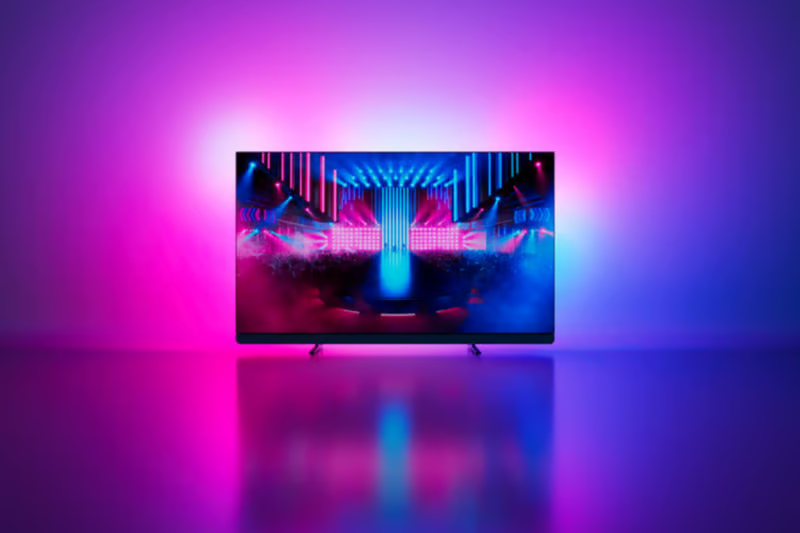
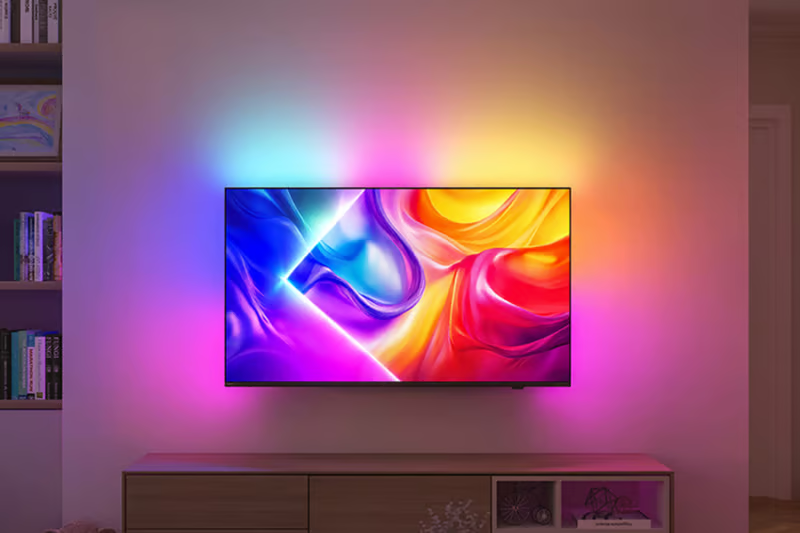
Philips TVs offer a unique experience with Ambilight technology. The integrated lights behind the TV respond to what you’re watching. This not only enlarges your screen visually but also creates a cosy atmosphere in your living room.
The Ambilight Suite includes several modes:
Sunrise Mode:
Wake you up gently with gradual lighting.
Lounge Mode:
Let you relax in ambient lighting even when the TV is off.
Ambisleep Mode:
Help you unwind before bed with soothing sounds and sunset lighting.
Audio quality
While most built-in speakers are adequate, some TVs offer advanced audio enhancements. Look for features like:

Bowers & Wilkins built-in sound system:
Integrated Bowers & Wilkins sound systems are designed to deliver an exceptional audio experience, with crystal-clear dialogue and deep, accurate bass. The frontal design ensures superior sound quality, providing an immersive audio experience without the need for external speakers.

External soundbars:
External soundbars can significantly improve your audio experience if the built-in speakers are lacking. They provide richer, more powerful sound and often include features like wireless subwoofers and Bluetooth connectivity, allowing for easy integration with other audio devices.
Smart features
Modern smart TVs have many features that work well with your smart home systems.

Voice assistants
Consider TVs with integrated voice assistants like:
- Google Assistant
- Amazon Alexa
These allow you to control your TV and other smart home devices with simple voice commands, making it easy to search for shows, adjust settings, and manage other smart home devices easily.
Streaming services
Smart TVs offer access to a wide range of streaming services such as:
- Netflix
- Amazon Prime Video
- Disney+
With built-in apps, you can stream your favourite shows and movies directly from the TV without needing an external device.
Smart home integration
Check if the TV can control other smart home devices like lights, security cameras, and thermostats. This makes it easy to manage everything from one place and automate your home from your TV.
Screen mirroring and casting
Smart TVs often support screen mirroring and casting from your smartphone or tablet, allowing you to show photos, videos, and apps on the big screen. Technologies like:
- Chromecast
- AirPlay
make it easy to share content with friends and family.
Personalized recommendations
Many smart TVs use AI to suggest shows and movies based on what you like to watch. This helps you find new content without searching manually.
Design
If aesthetics and style are your priorities, consider these design features:
Clean and sleek design
Look for stylish and minimalist designs that look great in any room.

Swivel stand and adjustable stand width
Swivel stands let you change viewing angles, while adjustable stand widths allow the TV to fit in different TV cabinets.
Wall-mountable options
Ensure your TV can be easily mounted on the wall to keep your space clean and organized.
Final considerations
- Payment options (financing, installments): When purchasing a TV, considering payment options like financing or installment plans can help manage the cost. Many retailers offer flexible payment plans that allow you to spread the cost over time, making it easier to afford higher-end models.
- Warranty and service options: Warranty and service options are crucial for protecting your investment. Some retailers offer extended warranties that provide additional coverage for repairs or replacements beyond the standard period. Also, consider the availability of in-home service and how easy it is to access customer support.
- Trial programs: If you’re uncertain about committing to a particular TV, some brands offer trial programs that let you to test the product before making a final decision. For example, Philips Ambilight TV may be available for a trial period, giving you the opportunity to experience the features and performance in your own home before deciding if it’s the right fit for you.
- Software updates: When selecting a new TV, it's worth considering whether the manufacturer provides ongoing software updates. These updates can improve performance, introduce new features, and ensure your TV remains compatible with the latest technology. This way, your investment stays up-to-date and delivers the best viewing experience over time.
Conclusion
Choosing the right TV means thinking about what you need, like, and can afford. Use this guide to find the perfect TV for you. Whether you care most about picture quality, screen size, special features like Ambilight, or gaming capabilities, there's a TV that’s just right for you. Happy TV shopping!
This article was created with the assistance of AI, along with detailed input, careful editing, and fact-checking by our team to ensure accuracy and quality.
Recommended products
- 65OLED950/12
- 164 cm (65") Ambilight TV
- 4K OLED. VRR 144 Hz
- Dolby Vision & Atmos
- P5 Dual AI Picture Engine
- 65OLED910/12
- 164 cm (65") Ambilight TV
- 4K OLED. VRR 144 Hz
- Bowers & Wilkins sound
- P5 AI Perfect Picture Engine
- 65OLED810/12
- 164 cm (65") Ambilight TV
- 4K OLED. VRR 144 Hz
- P5 AI perfect picture engine
- Dolby Vision and Dolby Atmos
- 65OLED760/12
- 164 cm (65") Ambilight TV
- 4K OLED. 120 Hz
- P5 AI perfect picture engine
- Dolby Vision and Dolby Atmos


You might like

How to place your TV right in any room
Reading time: 12-14 min.
What makes a TV good for gaming?
Reading time: 6-8 min.
What is Titan OS?
Reading time: 4-6 min.
What is Ambilight TV? Why should you have one?
Reading time: 6-8 min.
What is Quantum Dot?
Reading time: 4-6 min.
What is a Smart TV? Key features explained
Reading time: 4-6 min.



Sign up to the Philips newsletter for exclusive offers
- £10 off your first purchase on the Philips online store.*
- Exclusive member offers and early access to sales.
- News on product launches and tips for healthy lifestyles.
- £10 off your first purchase on the Philips online store.*
- Exclusive member offers and early access to sales.
- News on product launches and tips for healthy lifestyles.